
Boosted Post vs. Facebook Ad: What Changes?
Prices and platform details current as of November 2026.
When comparing a boosted post vs. a Facebook ad, the main difference is control. Boosting adds paid reach to an existing post with simpler settings, while Meta Ads Manager offers more choices for targeting, placements, and tracking leads. For Knoxville service businesses, that changes what you can measure beyond likes and clicks.
What Is the Core Difference Between a Boosted Post and Meta Ads Manager?
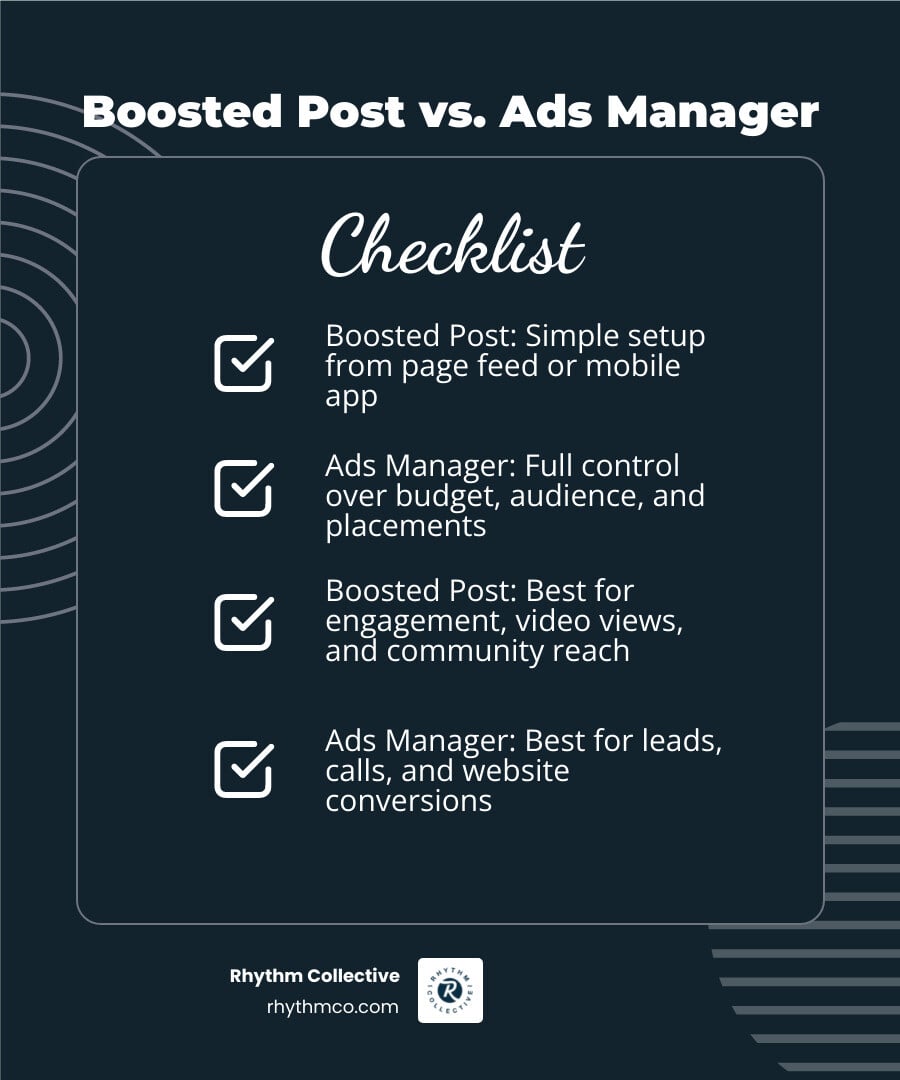
A boosted post is an organic post published on your Facebook or Instagram page that you pay to show to a wider audience. Setting up a boost takes only a few clicks directly from your business page feed or the mobile app. The primary goal of a boosted post is increasing post visibility, video views, and community engagement.
A Facebook ad campaign is built inside Meta Ads Manager, a dedicated dashboard designed for structured advertising. Ads Manager uses a three-tier system: campaign, ad set, and ad. This platform supports direct-response goals such as form submissions, phone calls, and website purchases.
Understanding the mechanics behind effective Facebook advertising strategies for Knoxville businesses helps owners pick the correct tool for their specific operational targets.
How Boosted Posts Function on Facebook and Instagram
When you click the blue "Boost Post" button on an existing update, Meta creates a simplified ad directly linked to that public post. The ad maintains all organic likes, comments, and shares on your public timeline.
This setup limits technical configuration. You can choose basic goals like getting more messages, website visits, or post engagement. However, you cannot access advanced bidding strategies or multi-stage sales funnels through the standard boosting interface.
How Meta Ads Manager Campaigns Function
Meta Ads Manager organizes advertising into three distinct levels:
- Campaign Level: Defines your main advertising objective, such as lead generation, sales, traffic, or app promotion.
- Ad Set Level: Sets your budget, schedule, audience targeting criteria, and placement locations across Meta technologies.
- Ad Level: Houses the visual creative, headlines, text variations, destination links, and tracking parameters.
Ads Manager allows businesses to run dark posts, which are ads that do not appear on your public business page timeline. This prevents your public feed from being cluttered with repetitive promotional messages or split-test variations.
| Feature Category | Boosted Post | Meta Ads Manager Campaign |
|---|---|---|
| Creation Interface | Page feed, Instagram app, or Ad Centre | Meta Ads Manager dashboard |
| Primary Objectives | Page likes, comments, video views, basic traffic | Leads, sales, app installs, catalog promotions |
| Audience Targeting | Basic demographics, interests, local radius | Custom Audiences, Lookalike Audiences, exclusions |
| Placements | Automatic feed, Stories (limited manual choice) | Feeds, Reels, Stories, Messenger, Audience Network |
| Creative Types | Existing timeline post format | Carousels, instant forms, dynamic creative, video |
| Conversion Tracking | Basic click and view reporting | Meta Pixel, Conversions API, custom offline events |
| A/B Testing | Not supported natively on the post | Native split testing for creative, copy, and audiences |
How Do Features Differ in a Boosted Post vs Facebook Ad Campaign?
Comparing a boosted post vs facebook ad reveals substantial differences in advertiser control. While boosting provides speed, Ads Manager offers precision tools that govern who sees your message, where it appears, and how results get tracked.
Targeting and Audience Reach: Boosted Post vs Facebook Ad
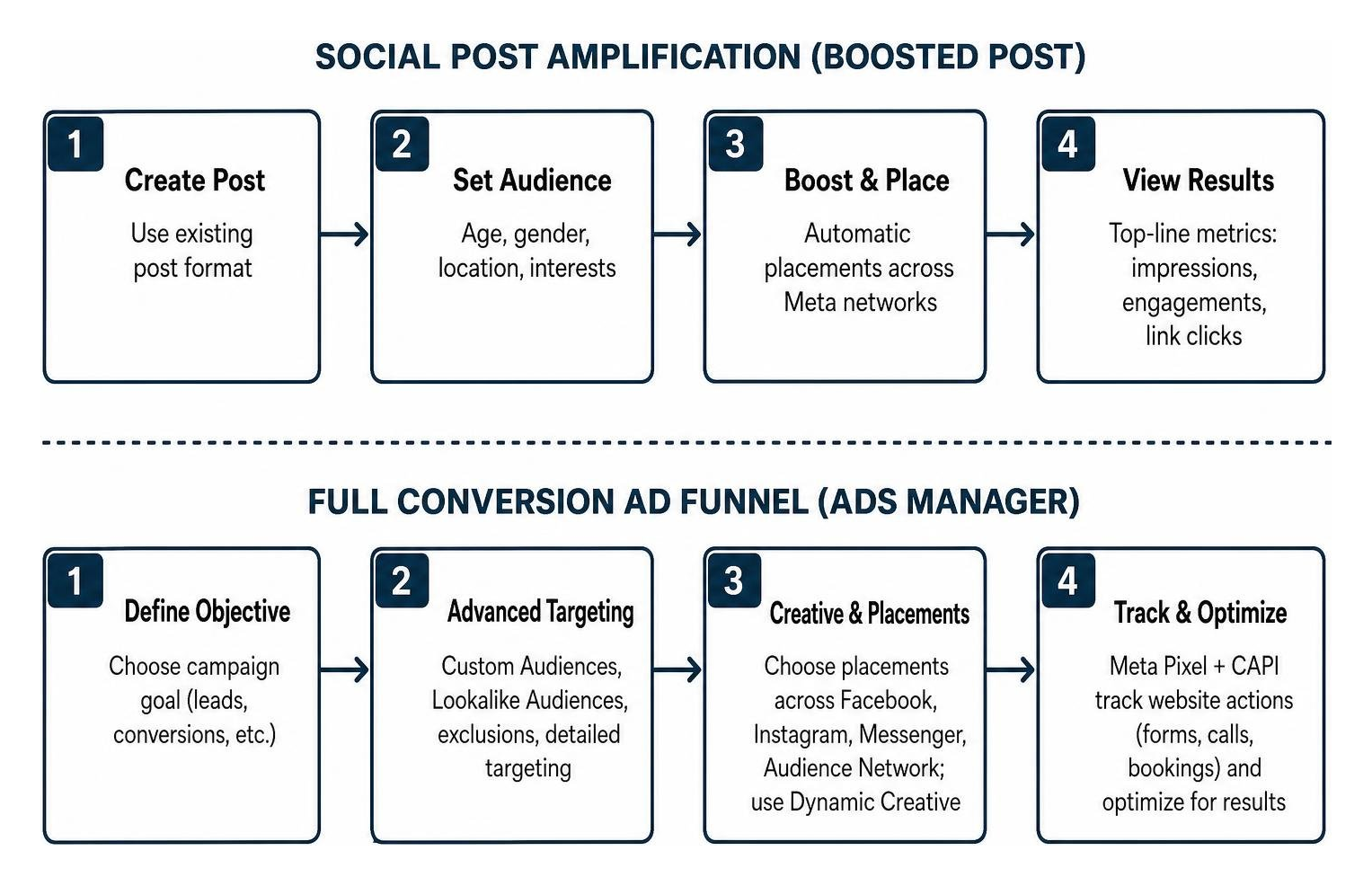
Boosted posts allow advertisers to select an audience based on age, gender, geographic location, and general interests. For example, a home improvement contractor can draw a 25-mile radius around Knoxville, Maryville, or Oak Ridge to reach local homeowners.
Meta Ads Manager expands targeting options significantly, as documented in guides on Boosted Posts vs. Paid Ads: Key Differences and When to Use Each. In Ads Manager, you can build Custom Audiences using your own customer lists, website visitors, or video viewers. You can also generate Lookalike Audiences to find new users who share traits with your best past customers, while excluding existing clients from seeing top-of-funnel ads.
Creative Formats and Placement Controls

Boosted posts are restricted to the format of the original post, such as a single image, video, or photo album. You have minimal control over where the post appears across Meta networks.
Ads Manager lets you choose specific placements across Facebook Feeds, Instagram Reels, Messenger, and third-party apps via the Audience Network. You can also deploy Dynamic Creative, which automatically tests up to 5 images, 3 headlines, and 2 text descriptions to identify the highest-performing asset combinations.
Analytics, Attribution, and Pixel Tracking
Boosted posts provide top-line performance metrics, such as total impressions, post engagements, and link clicks. These numbers show how many people interacted with your post on the platform.
Ads Manager connects directly to the Meta Pixel and the Conversions API (CAPI). This tracks actions taken on your external website, including completed quote forms, phone calls, and service bookings. These tracking tools support profit-driven marketing strategies by measuring cost per qualified lead instead of just cost per click.
How Do Costs and Optimization Timelines Compare?
Both boosted posts and full ad campaigns share the same underlying Meta advertising auction. However, their cost requirements, billing fees, and algorithmic optimization windows differ substantially.
Budget Requirements and Costs: Boosted Post vs Facebook Ad
You can boost a post on Meta for as little as $1 per day, which makes it accessible for low-budget updates. According to Meta Business Help Center guidance on boosting posts, boosting starts from a low daily minimum and is managed through the page post interface. Meta Ads Manager campaigns also use daily or lifetime budgets, with the minimum set when you create the ad set.
A critical cost consideration involves mobile platform fees. Apple applies a 30% service fee on boosted posts purchased directly inside the Facebook and Instagram iOS mobile apps. Business owners can avoid this 30% surcharge by boosting posts through a desktop web browser or funding their ad account via Ads Manager. Apple support documentation explains how in-app purchases and service fees apply to digital goods, while Meta Business Help Center covers paying for ads on iOS devices.
Algorithmic Optimization and the Learning Phase
When you publish a new ad set in Ads Manager, it enters the learning phase. During this period, Meta machine-learning models show the ad to different segments within your audience to determine who is most likely to complete your selected objective.
According to Meta Business Help Center guidance on the learning phase, an ad set typically requires about 50 optimization events within a 7-day period to exit the learning phase and stabilize performance. For instance, if a hypothetical plumbing company in Knoxville achieves a $10 cost per lead, the campaign requires an estimated budget of roughly $500 per week per ad set to complete this algorithmic calibration.
Applying structured optimization helps businesses utilizing targeted advertising for Knoxville service businesses maintain stable acquisition costs over time.
When Local Service Businesses Choose Each Option
Choosing between boosting a post and running an Ads Manager campaign depends on the operational objective, available budget, and required timeline.
Situations Suited for Post Boosting
Boosting an organic post is practical in specific scenarios:
- Local Community Announcements: Sharing holiday operating hours, emergency weather updates, or community event sponsorships.
- Amplifying Social Proof: Putting modest budget behind customer review posts or project photos that already earned organic engagement.
- Short-Term Visibility: Running a 48-hour awareness push with a budget under $50 where complex conversion tracking is unnecessary.
Situations Suited for Full Meta Ad Campaigns
Ads Manager is the appropriate tool when direct business outcomes are required:
- Customer Acquisition: Generating direct form fills, service calls, and online booking requests.
- Website Retargeting: Serving follow-up offers to individuals who visited specific service pages on your website within the past 30 days.
- Controlled Testing: Evaluating distinct creative hooks, pricing offers, or video testimonials through crafting a structured digital advertising plan.
Combining Both Methods into a Unified Strategy
Many service companies use both formats together across their marketing funnel. Organic posts with proven engagement can be boosted with $10 to $20 to build community trust across East Tennessee markets. Meanwhile, dedicated Ads Manager campaigns run in the background to capture high-intent leads and retarget past site visitors.
Frequently Asked Questions About Facebook Advertising Options
Can a boosted post be converted directly into a full ad campaign?
Yes. Inside Meta Ads Manager, you can create a new campaign and choose "Use Existing Post" at the ad level by entering the original post ID. This preserves all existing comments, likes, and social proof while enabling advanced targeting, tracking, and placement controls.
What is a dark post and how is it used in Meta Ads Manager?
A dark post is an unpublished social media ad that appears in targeted users' feeds but does not show up on your business's public page timeline. Advertisers use dark posts to run multiple creative variations or location-specific offers without cluttering their main organic feed.
Can I manage boosted-post billing outside the mobile app?
Yes. You can manage and pay for boosted posts through Meta Business Suite or Ads Manager on a desktop browser. Doing so bypasses the 30% Apple App Store service fee applied to in-app boosts initiated on iOS devices.
How many conversions are required to complete the Meta learning phase?
According to Meta's learning phase guidance, an ad set requires roughly 50 conversion events within a 7-day window to exit the learning phase. If your budget generates fewer conversions, the ad set may remain in "Learning Limited," causing higher cost volatility.
Talk with a Growth Specialist About Social Media Advertising
Have a question about marketing your business? Talk with a growth specialist at Rhythm Collective in Knoxville to review your social media marketing and paid advertising strategy.