

How Google Ads Match Types Control Which Searches Show Your Ads
Prices and platform details current as of November 2026.
Google Ads match types control how closely a search query must relate to your keyword before your ad can appear. Broad match reaches related searches, phrase match covers searches containing the meaning of your keyword, and exact match targets searches with the identical meaning or intent. Negative keywords block unwanted search queries entirely from triggering ad impressions.
This educational guide explains how these keyword configurations function and how search queries connect to ad auctions for service businesses in East Tennessee.
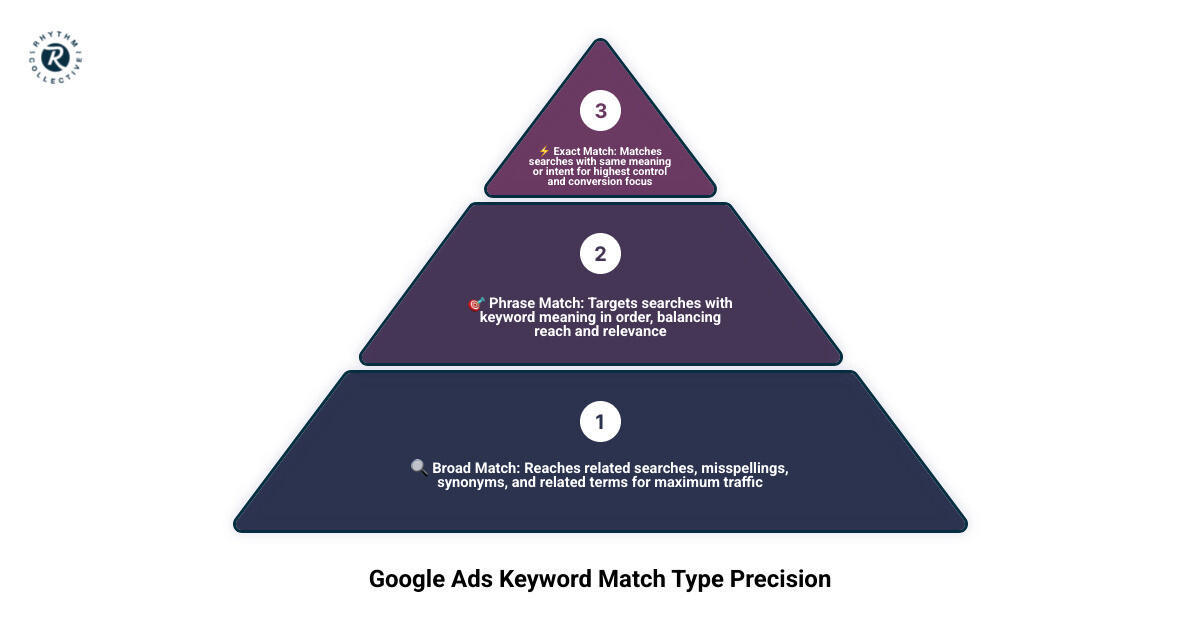
How Google Ads Match Types Work for Local Advertising
Keyword match types are targeting rules that determine which search queries enter the Google Ads auction. When a user submits a search query in Google, the search engine compares those words against your targeted keyword lists. Choosing the right settings is a core element of effective PPC management in Knoxville because it directly dictates ad eligibility and overall relevance across search campaigns.
According to official Google Ads matching documentation, the system evaluates contextual factors, user intent, recent search activity, and your ad settings during the retrieval process. For local service companies in East Tennessee, these matching settings separate high-intent commercial requests from casual informational browsing.
Syntax and Core Rules for Google Ads Match Types
Google Ads relies on specific punctuation syntax to identify how to handle each keyword in your account. You can configure keywords using plain text, quotation marks, or square brackets:
- Broad Match: Plain text without formatting symbols (for example,
plumber knoxville). - Phrase Match: Enclosed in quotation marks (for example,
"water heater repair"). - Exact Match: Enclosed in square brackets (for example,
[emergency hvac service]).
Per Google platform guidelines on how to add keywords, individual keyword strings support up to a maximum length of 10 words. Words beyond this limit are ignored during the auction matching evaluation.
How Close Variants Affect Match Types
Close variants allow keywords to match user searches that are similar, but not strictly identical, to the targeted keyword string. According to the Google keyword close variants definition, close variants include misspellings, singular or plural forms, stemmings, abbreviations, accents, reordered words, and implied terms sharing identical search intent.
Close variant matching applies automatically across all Google Ads match types, including exact match keywords. Advertisers cannot opt out of close variants in platform settings, making regular search term reviews essential for cost control.
How Do Broad, Phrase, and Exact Match Compare?
Each match type represents a different balance between audience reach, search precision, and cost control. Aligning these settings with realistic budget planning helps prevent unexpected ad spend across different campaign objectives.
| Match Type | Syntax | Query Reach | Control Level | Relative Click Cost |
|---|---|---|---|---|
| Broad Match | keyword |
Maximum | Algorithmic / Contextual | Generally Lower CPC |
| Phrase Match | "keyword" |
Moderate | Meaning & Implied Intent | Moderate CPC |
| Exact Match | [keyword] |
Restricted | Strict Intent Alignment | Generally Higher CPC |
Broad Match and Smart Bidding Mechanics
Broad match is the default match type assigned to new keywords in Google Ads. It serves ads on queries related to your keyword concepts, landing page content, and recent search behaviors. According to Google Search match type updates, 15% of all daily search queries on Google are completely novel terms that have never been searched before.
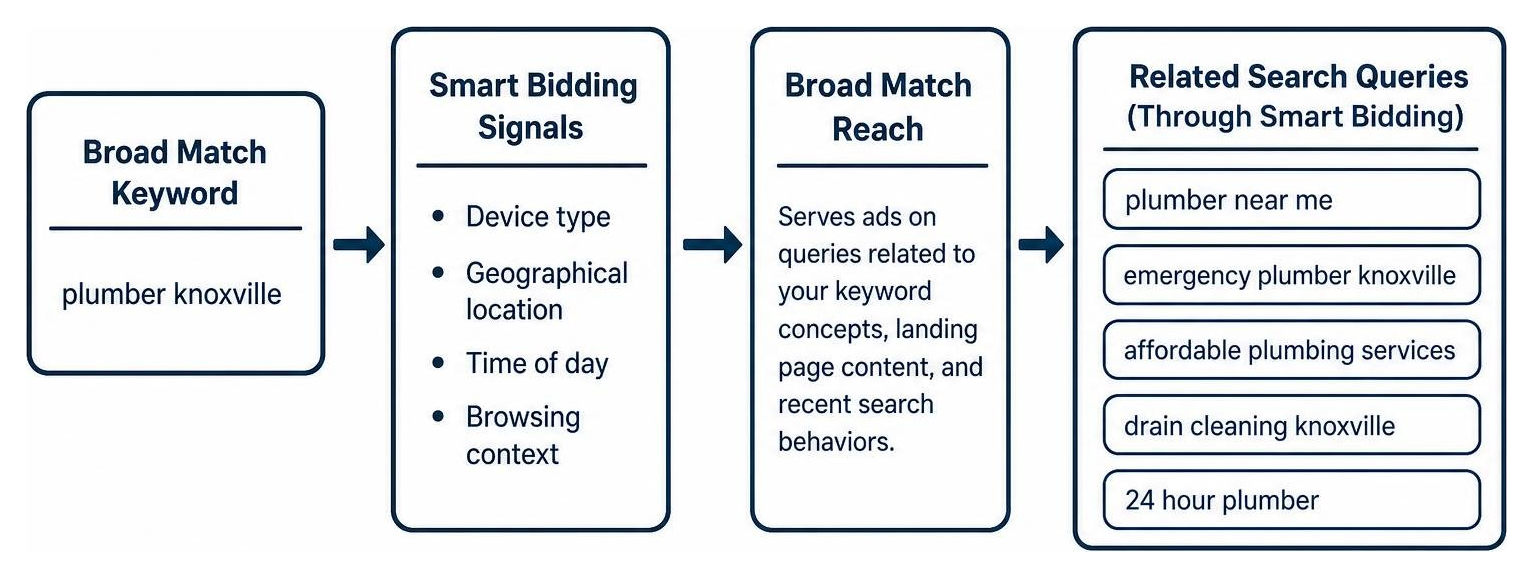
Google pairs broad match with Smart Bidding, an automated system that adjusts bids using real-time auction signals. This combination evaluates device type, geographical location, time of day, and browsing context before placing a bid on an incoming search query.
Phrase Match and the Retirement of Broad Match Modifier
Google phased out Broad Match Modifier (BMM), which used plus signs (+keyword), and absorbed its mechanics into phrase match. Phrase match triggers ads on searches that include the meaning of your keyword while respecting word order whenever sequence changes the underlying intent.
For example, a hypothetical moving company serving routes between Knoxville and Nashville can use "moving knoxville to nashville". Phrase match prevents the ad from serving on searches for "moving nashville to knoxville" because directional word order alters the fundamental meaning of the user query.
Exact Match for Precision and Search Intent Control
Exact match restricts ad delivery to queries that share the exact meaning or intent of your targeted phrase. While exact match historically required literal word-for-word matches, modern exact match incorporates synonyms and paraphrasing that do not alter the underlying goal.
Exact match keywords give service businesses tight control over search terms, ensuring budget goes toward specific high-intent commercial terms with predictable customer intent.
How Do Negative Keywords Prevent Irrelevant Search Traffic?
Negative keywords prevent your ads from triggering on specific, unwanted search queries. Implementing negative keywords helps eliminate unqualified clicks from non-commercial searchers, preserving your daily ad spend. For service businesses evaluating overall search strategies alongside platforms like a Google Local Services Ads guide, negative keyword lists provide essential query filtering for standard Search campaigns.
Negative Match Types and Keyword Exclusions
Negative keywords use the same broad, phrase, and exact syntax as positive keywords, but they operate under different platform rules. Most notably, negative keywords do not expand to close variants, synonyms, or misspellings.
| Match Type | Negative Syntax Example | Search Query: free roof repair |
Search Query: roof repairs quote |
|---|---|---|---|
| Negative Broad | free roof |
Ad Blocked | Ad Shows |
| Negative Phrase | "free estimate" |
Ad Shows | Ad Shows |
| Negative Exact | [diy roof repair] |
Ad Shows | Ad Shows |
Because negative keywords require exact character strings, you must manually add common misspellings, singular forms, and plurals to your negative lists to prevent unwanted ad impressions.
Building Local Service Negative Keyword Lists
Local service companies in Knoxville, Oak Ridge, Maryville, and across East Tennessee frequently use negative keyword lists to exclude unqualified traffic categories:
- Employment Searches: Exclude words such as
jobs,careers,salary,application, andhiring. - DIY and Educational Queries: Block terms like
how to,tutorial,diagram,free, andparts list. - Out-of-Area Locations: Add cities outside your operational service radius to prevent clicks from distant areas.
- Unrelated Services: If an HVAC business only fixes residential units, exclude
commercial,industrial, andautomotive.
How Does Google Prioritize Competing Keywords and Campaigns?
When a user's search query matches multiple keywords or campaigns in an account, Google applies specific auction logic to determine which ad enters the auction.
Per technical Google Ads API search term match type specifications, Google tracks matching distinctions like pure exact and near-variant terms at the code level during retrieval.
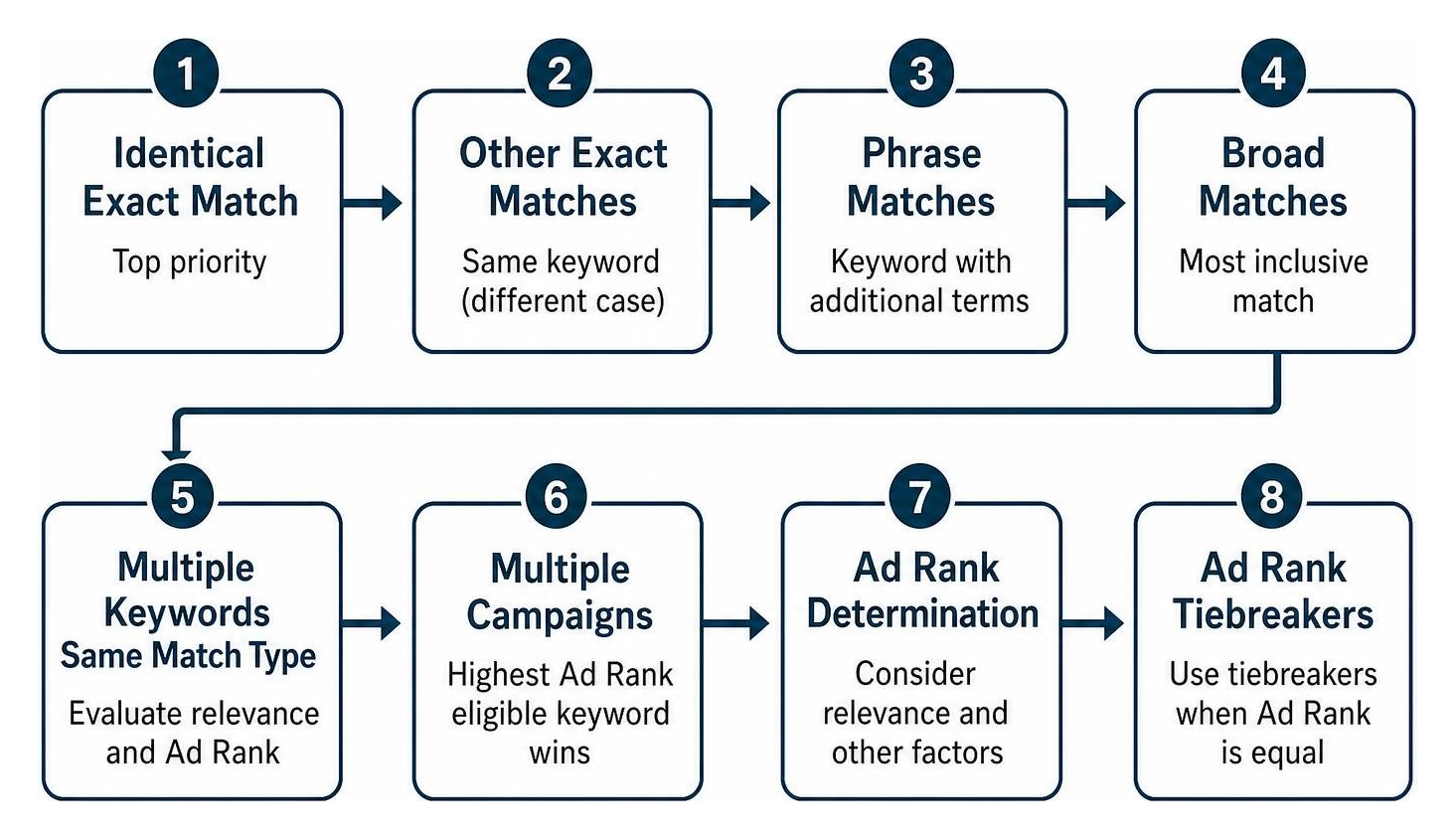
Auction Priority Rules for Google Ads Match Types
Google Ads processes keyword selection using a defined order of preference across eligible keywords:
- Identical Exact Match: An eligible exact match keyword identical to the search query always receives top priority.
- Identical Phrase and Broad Match: If no identical exact keyword exists, identical phrase and broad keywords are preferred over non-identical variations.
- Ad Rank Tiebreakers: When multiple non-identical keywords match a query, the keyword with the highest Ad Rank enters the auction.
Search Keywords Versus Performance Max Search Themes
Performance Max campaigns use machine learning to serve ads across Search, YouTube, Display, and Maps. In accounts running both Search and Performance Max campaigns, the platform prioritizes keywords according to set hierarchy rules:
- Exact match Search keywords identical to the query take precedence over Performance Max.
- Search themes in Performance Max share priority with identical broad and phrase match Search keywords.
- When priorities are equal, Google uses artificial intelligence relevance calculations and Ad Rank as the final tiebreakers.
Frequently Asked Questions About Google Ads Keyword Match Types
Which keyword match type provides the highest search volume?
Broad match provides the widest reach and search volume in Google Ads. It uses contextual signals, landing page content, and user search history to match your ad with related search queries. This makes broad match useful for discovering new query variations when paired with automated bidding strategies.
Can you opt out of close variants in Google Ads?
No, close variants are a mandatory setting across broad, phrase, and exact match types in Google Ads. Advertisers manage unwanted variations by reviewing search term reports and applying negative keywords. Negative keywords ensure irrelevant close variants do not continue consuming ad budget.
How do negative keyword match types differ from regular match types?
Negative keyword match types do not expand to include close variants, synonyms, or misspellings. To block unwanted traffic effectively, you must manually add each spelling and word variation to your negative keyword list. Regular positive match types expand automatically to match equivalent intent.
Request a Keyword Estimate for Your Business
Thinking about Google Ads? Request a free keyword estimate to see local search demand and click costs for your services from a PPC agency in Knoxville.