
How Facebook Lead Ads Capture and Deliver Leads
Facebook lead ads capture prospect details through native forms directly inside Facebook and Instagram feeds, routing contact data into customer management systems. These mobile forms populate user details automatically from personal accounts to reduce friction and eliminate slow website loading times. Lead records transfer in real time via automated webhooks and API connections, or through periodic spreadsheet downloads.
For regional contractors, healthcare providers, and local service businesses across Knoxville, Chattanooga, and the Tri-Cities, instant forms collect submitted prospect information without inherently validating user accuracy. Lead-delivery speed depends on the chosen integration method, ranging from real-time CRM routing to manual batch exports. Knowing how platform mechanics, targeting configurations, and lead ingestion workflows operate helps you evaluate ad spend and customer response time.
Prices and platform details current as of November 2026 based on Meta Business Help Center standards.
What Are Facebook Lead Ads and How Do They Function?
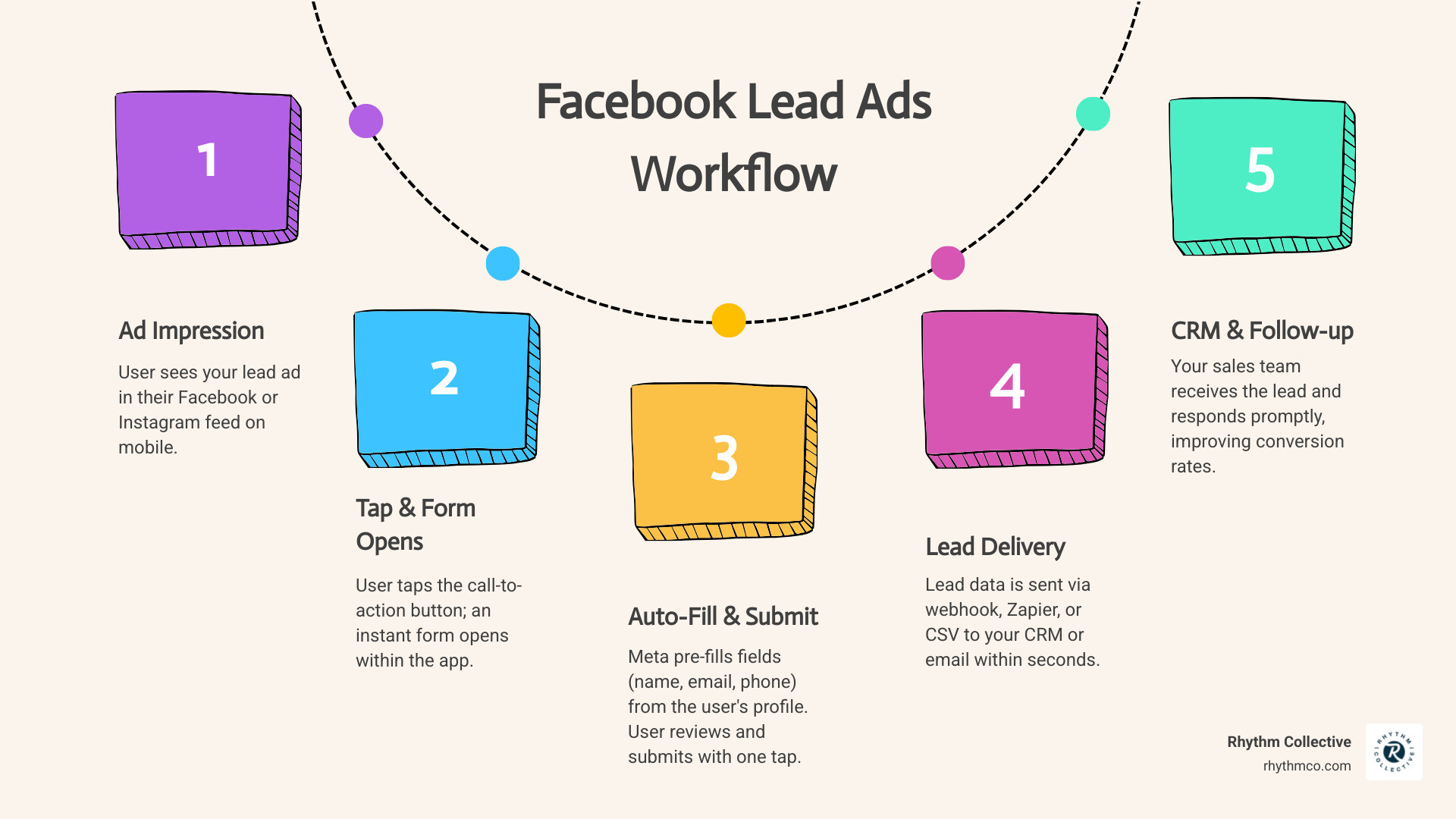
Lead generation campaigns on social platforms allow commercial enterprises to capture prospect inquiries directly within the active social feed. According to Meta's reporting standards, lead ads are designed to collect contact information from people who may be interested in a business. For organizations developing targeted Facebook advertising strategies, these integrated ad units remove the friction of visiting an external website.
When a user taps an ad, an interactive instant form appears directly on the mobile screen. Meta's lead ad documentation explains that these forms are built for mobile completion. Users can verify their information, answer specific questions, and submit the inquiry without waiting for an external website to load.
Core Mechanics of Instant Forms in Facebook Lead Ads
Instant forms function by pre-populating standard contact fields using information from the user's Meta profile. According to the Facebook / Instagram Lead Ads documentation, fields such as full name, email address, phone number, and city can populate automatically.
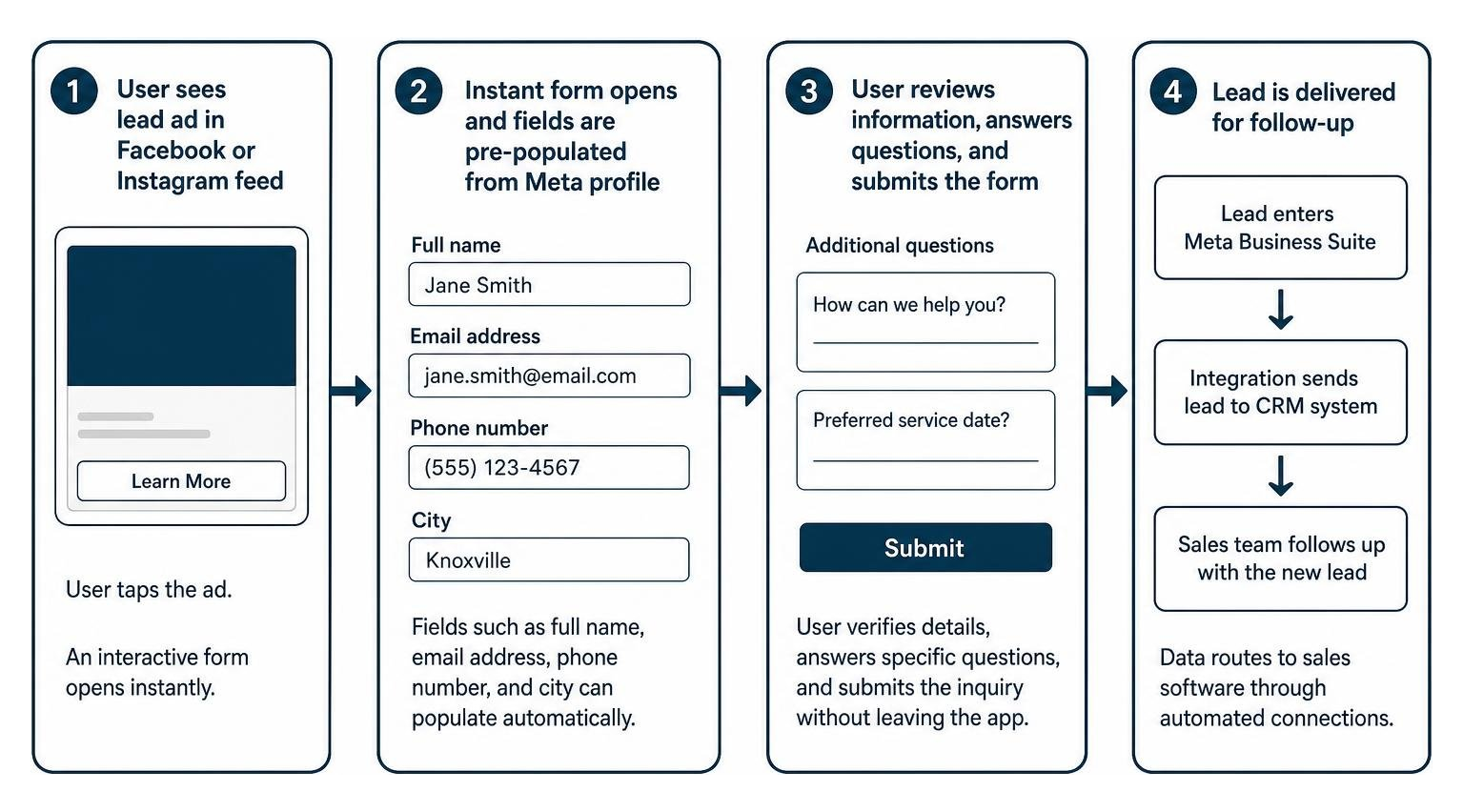
This automatic pre-population reduces typing friction on mobile devices, though it does not inherently guarantee that the account details are verified or currently accurate. Once a user clicks submit, the data enters Meta Business Suite, where it can route to sales software through automated data connections. Advertisers can customize form headers, include policy disclaimers, and present confirmation screens directing users to phone lines or business websites.
Conversion Locations and Supported Ad Formats
Meta Ads Manager supports several formats for lead generation campaigns, allowing advertisers to align creative assets with their business goals.
Advertisers can choose from several distinct ad formats and conversion locations:
- Single Image Ads: Feature a single photograph, graphic, or product illustration paired with primary text, a headline, and a call-to-action button.
- Carousel Ads: Display two or more scrollable media cards according to Meta's ad setup guide, each with its own link or form trigger, displaying distinct services or products.
- Video Creative: Uses vertical or square video assets to explain service workflows or present customer testimonials.
- Click-to-Call Ads: Directs the user's mobile device to dial a phone number immediately instead of opening a form.
- Messenger and Instagram Direct: Opens an automated chat conversation inside messaging apps to qualify prospects through interactive prompts.
How Do You Set Up and Target a Lead Generation Campaign?
Setting up a lead ad requires configuring technical assets within Meta Business Suite and Meta Ads Manager. Campaign setup fits within a broader digital advertising plan designed to generate measurable business inquiries across target geographic territories.
Technical Requirements and Meta Ads Manager Setup
To run lead ads, an advertiser must manage an active Facebook Business Page. The setup requires selecting the Leads objective at the campaign level within Meta Ads Manager.
- Link Verification and Policy Requirements: Advertisers must link to an active privacy policy URL, as Meta requires formal legal disclosures before capturing personal consumer data. Meta's lead ad terms and policies outline these requirements.
- Instant Form Creation: In the ad creation tab, build an instant form, specifying required contact fields, custom questions, and completion screen links.
- Budget Configuration: Set daily or lifetime budgets. Meta's budget guidance explains how campaign budgets control ad delivery.
- Publishing and Review: Once published, Meta reviews the ad creative and form for compliance with advertising standards.
Audience Targeting for Local Service Areas
Local service businesses can focus ad delivery on specific geographic zones across East Tennessee. Advertisers can target by county, city name, or postal codes across Knoxville, Chattanooga, Maryville, Oak Ridge, and the Tri-Cities area of Johnson City, Kingsport, and Bristol.
Campaign configurations through a PPC agency in Knoxville pair geographic radius boundaries with custom audience lists. Custom audiences use existing customer phone lists or email records to reach past clients. Advertisers can also use lookalike modeling or Advantage+ audience settings, which let Meta's machine-learning algorithms find similar prospects across surrounding service areas based on past interaction patterns and demographic traits.
How Are Leads Delivered and Integrated into Your CRM?
Capturing a lead on Meta initiates the process; contact records transfer directly to sales teams. Structured lead delivery routes incoming submissions into active workflows, operating as part of PPC management.
Real-Time CRM Webhooks and Graph API Data Ingestion
Meta provides several technical pathways to retrieve captured lead records. As detailed in the Lead Ads developer documentation, developers can configure real-time Webhooks via the Meta Graph API.
Using Page access tokens rather than User access tokens prevents rate-limiting bottlenecks during high-volume periods. For non-technical setups, third-party connectors like Zapier or native CRM integrations pull incoming lead payloads immediately into systems like HubSpot, Salesforce, or ServiceTitan. Advertisers can also download leads manually via CSV spreadsheets inside the Meta Business Suite Leads Center. However, manual downloads do not provide real-time alerts.
Offline Conversions API and Downstream Lead Tracking
Capturing contact data is only part of tracking advertising efficiency. The Meta Conversions API (CAPI) allows businesses to pass offline conversion milestones, such as completed estimates or closed contracts, back to Meta Ads Manager.

When CRM data confirms which inquiries turned into paying customers, Meta's algorithm refines ad delivery. Instead of optimizing only for low-cost form submissions, the platform adjusts bidding to locate users who resemble closed revenue accounts over time.
How Can You Improve Lead Quality and Reduce Drop-Off?
Because instant forms pre-fill user information, campaigns can generate accidental submissions or outdated contact records, as the platform does not inherently verify the accuracy of pre-populated data. Form configurations balance entry speed with qualification criteria to manage lead quality.
Adding Higher Intent Filters to Facebook Lead Ads
The form builder includes several platform features to filter incoming submissions:
- Higher Intent Setting: Adds an extra confirmation step where users must review their pre-filled information and swipe to submit.
- Custom Multiple-Choice Questions: Requires users to manually select answers regarding project timelines, property types, or specific service needs.
- SMS Phone Verification: Sends a one-time passcode to the user's mobile number, confirming the phone number is active before form completion.
- Conditional Logic: Routes users to different question sets or a disqualification screen based on their previous answers.
Lead Form Comparison: Native Forms vs. Landing Pages
Choosing between native Meta forms and external landing pages involves operational trade-offs between form friction, data depth, and tracking control as detailed in Meta's instant form documentation.
| Feature Category | Native Meta Instant Forms | External Website Landing Pages |
|---|---|---|
| Form Friction Level | Reduced (profile data pre-populates automatically) | Higher (requires manual data entry on external site) |
| Page Load Speed | Instantaneous within the mobile app interface | Dependent on external hosting and mobile connectivity |
| Data Capture Depth | Standard profile fields plus custom platform questions | Configurable custom fields and interactive calculation tools |
| Tracking and Analytics | In-platform Meta campaign metrics and Webhooks | Full website analytics platforms and third-party pixels |
| Inquiry Verification | Profile data submitted without inherent contact verification unless validation tools are enabled | Multi-step site navigation requiring active user entry |
Frequently Asked Questions About Facebook Lead Generation
How much do leads from Meta ads typically cost?
Lead costs vary based on industry competition, audience size, and geographic market. Meta's auction and delivery system determines ad costs through competitive bidding, so no fixed price applies to every campaign. Highly competitive service categories generally see higher costs per inquiry than broader promotional campaigns.
How quickly should a business follow up with incoming leads?
Customer contact rates generally decrease as time elapses between initial inquiry submission and business response. Automated CRM webhooks allow businesses to trigger immediate SMS confirmations or dispatch notifications directly to sales staff across East Tennessee service territories.
Can you run lead ads without a website?
A business can run lead ads without a standard website by using native instant forms or click-to-call formats. However, Meta requires a valid link to a published privacy policy, which can be hosted on a standalone webpage.
Next Steps for Your Advertising Strategy
Have a question about marketing your business? Talk with a growth specialist at Rhythm Collective in Knoxville to review your paid campaigns and explore options for your social media marketing.